Platform Updates May 2024

Nicki Pabst
Co-founder & Email wizard

Deleted email

A trash can icon will join your folders on the dashboard. Deleted emails will appear in this folder, where you will have the option to restore them.

trashcan

Delete instantly

Directly on the dashboard you are able to delete your email, where as before you had to go to Settings and then choose "Delete".

Instant delete

Email supported emoji selector

The world's first email specific emoji library. If an email client doesn't support the emoji - you will simply not be able to find it.

Emoji picker

Color picker

We are excited to announce that you'll now have the option to use a color picker directly in the settings. This means you won't have to manually name your colors from a drop-down menu anymore. Additionally, we're introducing a color picker in the rich text menu bar. With this feature, you'll be able to color each word individually, providing you with greater flexibility and customization options.

color picker

Duplicate Component & User Roles

Nicki Pabst
Co-founder & Email wizard

Duplicate component

You can now make an exact copy of an edited component. This is the first step towards more personalized components, and we are looking forward to hear your feedback.

Dublicate of component

User roles

As the Admin of your account, you now have a clear overview of what the different user-roles have access to.

Roles and permission

Platform 2.0

Nicki Pabst
Co-founder & Email wizard

Live Collaboration

You will now be able to design and work together with your colleagues, in the same email! Join the battle, when your colleagues are smashing that keyboard, creating beautiful e-mails, and speeding up the process, as it was always was meant to be!

No more saving

Every action you make will save the email your are working in. The autosave feature got your back, and you will never again lose important work!

Calendar function

You can now create your own calendar invitation directly inside a button. That is quite amazing, because normally you will have to get the user to click on the preferred calendar program. With this new function, all calendars are supported, and it is super easy to create.

Calendar function

Rebranding to Better Email

Nicki Pabst
Co-founder & Email wizard

From today onwards, we've changed our name from Alpaco to Better Email.

Better Email logo

The name Alpaco has served us well, but we believe that Better Email more accurately expresses our mission - to help you create better emails!

We would also like to assure you that everything you have come to know and appreciate about Alpaco remains the same, just under a new name and domain: better.email.

There will be no disruptions in services or operations.

In the future, the name Alpaco will no longer be associated with us and the platform you use.

Thank you for your support and we look forward to continuing to help you produce the best emails.

Thank you 🙏

The Better Email Team

Smaller Improvements

Nicki Pabst
Co-founder & Email wizard
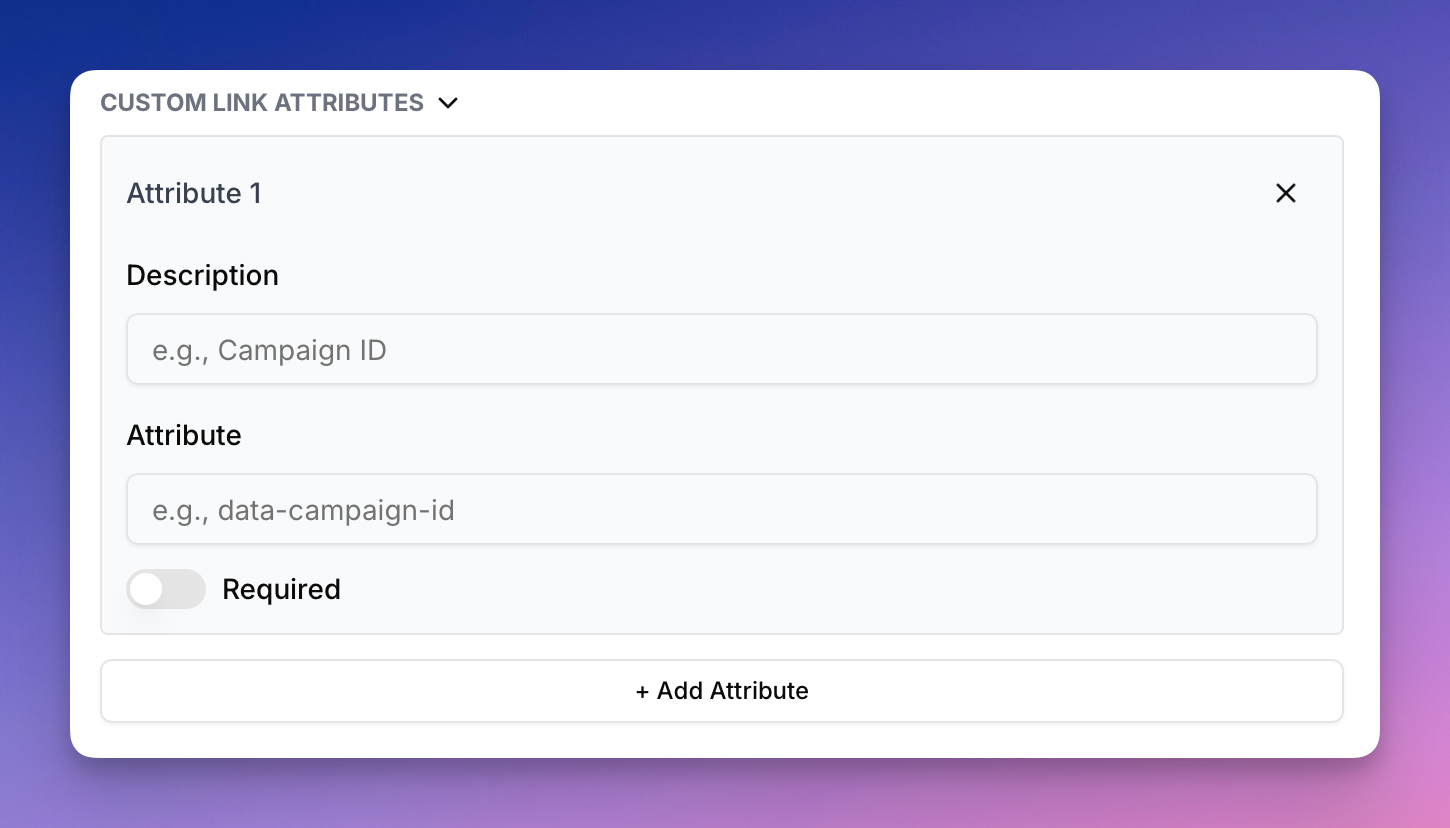
  • You can now add custom attributes on links in the rich text editor.
  • Customer.io integration now supports "Broadcasts"

... and other small UI/UX improvements

Customer.io Integration

Nicki Pabst
Co-founder & Email wizard

Today we're launching our Customer.io integration and its many ways of sending Email messages.

So if you've been contemplating switching to the platform, but still need that bit design and production boost the Better Email platform provides? Now you can indeed have it both ways.

Link Tracking

Nicki Pabst
Co-founder & Email wizard

We have an early Christmas present for those of you who have a need for creating tracking attributes for your links. Merry Christmas 🎄

Editor Improvements

Nicki Pabst
Co-founder & Email wizard

Today we're bringing a small handful of improvements for the email and template editor.

  • Correctly show "move" cursor when dragging an email block
  • Improved and faster image size detection warnings
  • "Insert Merge Tag" button now available from Template Editor preview as well
  • Show "Components" tab by default when opening Email Editor

Sending Test Email

Nicki Pabst
Co-founder & Email wizard

It's now possible to send a test email directly from Better Email, without having to export the email to your ESP first!

Send to multiple receivers by comma-seperating emails in the input. Quick and easy!

Secondary Actions from Emails Overview

Nicki Pabst
Co-founder & Email wizard

Now there's easy access to "Email Settings" and the "Clone feature" directly from the Email overview!

This makes it much easier to quickly change the name of an email from the overview.

We also introduced lots of smaller UI/UX improvements, all with the goal to make you more productive! 💪