Global Settings and Shared Inputs

Global settings and Shared inputs are now available in the Template Editor. Together, they make it easier to build one template that works across brands, markets, languages, and business units.
Set shared values once with Global Inputs and Global Script
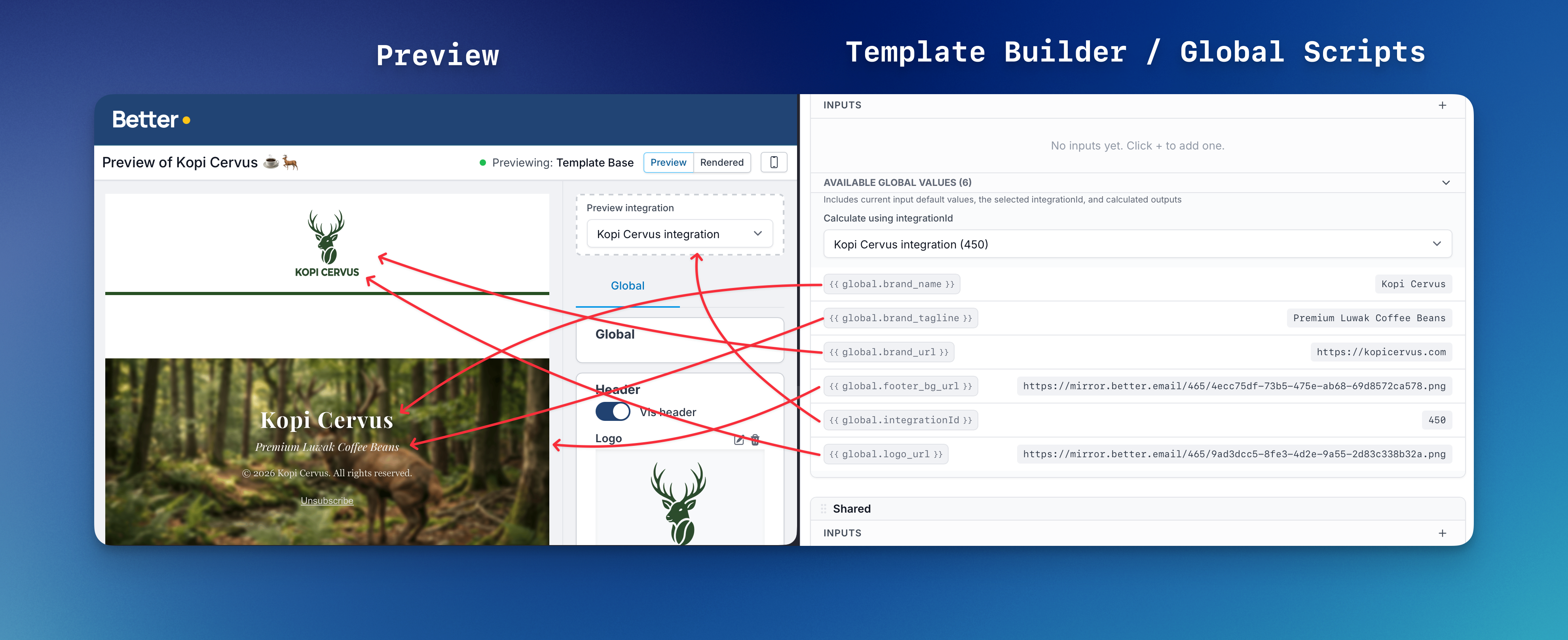
The new Global setting gives every template a place for values that belong to the full email. Use it for things like brand, market, language, theme, colors, logos, or footer details.
Global values can be used across the template base and every module, so you do not have to copy the same setup into each component.
Calculate values with Global Script
Global Script lets you calculate shared values once and use them everywhere. For example, a template can choose the right logo, color palette, or footer text based on the selected integration.
This is especially useful when several business units share one Email Design System, but each one needs its own brand output.
Reuse input definitions with Shared inputs
The new Shared setting lets you define an input once and reuse it in multiple modules. A shared color palette, CTA style selector, or alignment control can now stay consistent across the whole template.
Combined with Global Script, shared inputs can be scoped to the selected integration. For example, a background color palette can be defined once and populated with only the brand colors available for the chosen audience — so a module that supports multiple brands automatically limits its options to the right palette when the integration is set.
When the shared definition changes, every module that references it follows the update automatically.
Other fixes and improvements
- FX mode lets colors, placeholders, and select options follow values from template or global settings.
- Color fields can now show friendly names like Primary Blue instead of only showing hex values.
- Image inputs can now include built-in alt text, so marketers can manage the image and alt text together.
- Image inputs can now enforce size rules, helping prevent images that are too small or too large for a slot.
- Liquid errors now appear directly in the Template Editor and preview, so template authors can find issues faster.
- Betty now understands Global settings, Shared inputs, and FX mode when helping with template work.