Email checks
Email checks are automated quality gates that run on every campaign revision — from simple things like unrendered merge tags and oversized images to AI-powered review of spelling, tone, and the rendered layout. As an admin, you decide which checks run and how strict they are: a check can be off, show a warning, or block export entirely.
This page covers configuration. For how checks look and behave while building a campaign, see Pre-flight checks.
Only users with the Admin role can change email check settings. Everyone on the Campaign Workspace sees the results.
Configure checks
Go to Settings → Organization → Email Checks. Every check has a three-way control:
- Off — the check doesn't run.
- Warn — failures show as a pre-flight warning. Reviewers see it, but it doesn't stop anything.
- Block — failures prevent syncing to your ESP until the issue is fixed or overridden.
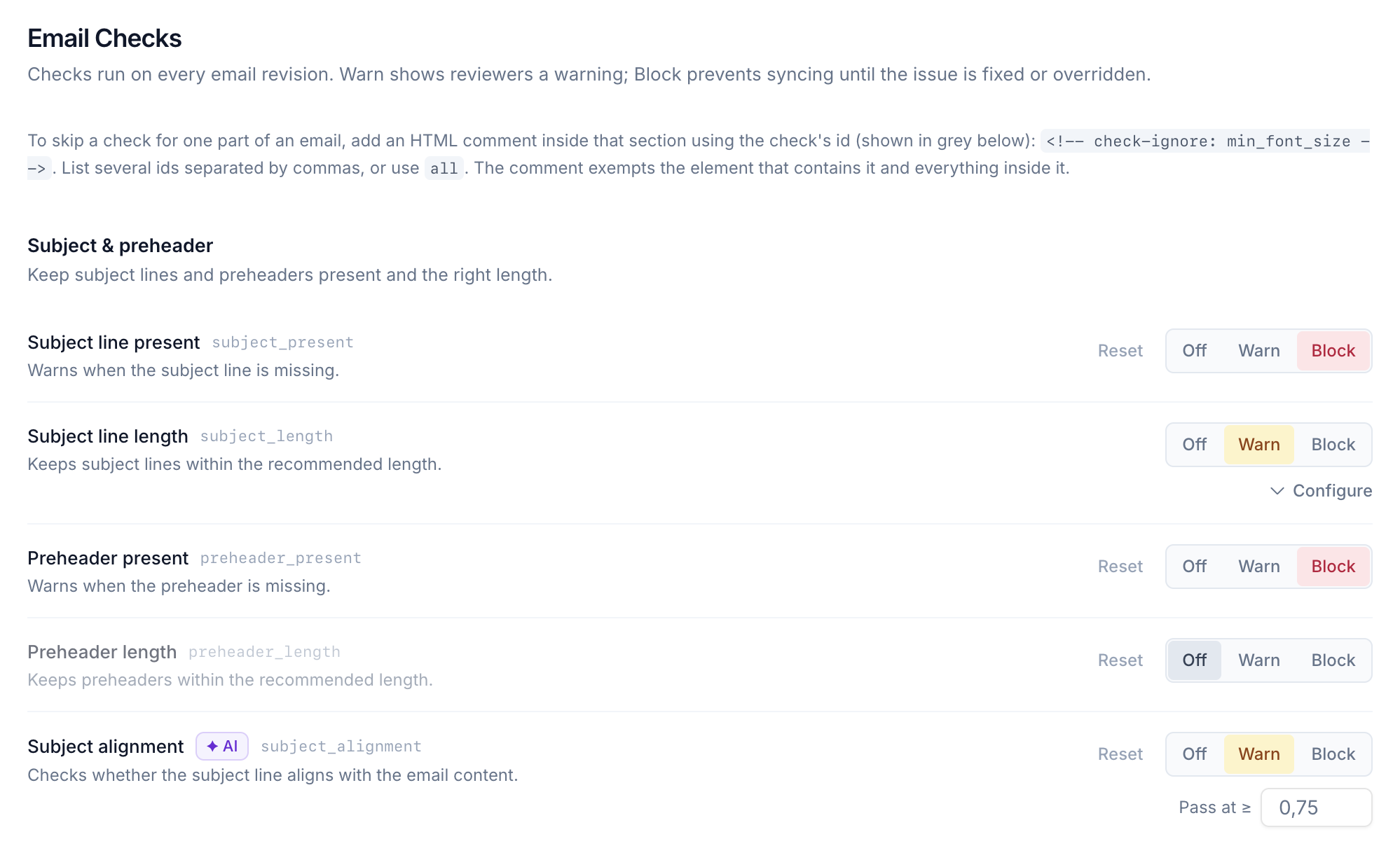
Changes save immediately and apply to the whole organization. A Reset action on each check returns it to the built-in default.
A Campaign type can override individual checks for its own Campaigns, for example making spelling block export for one newsletter while it only warns everywhere else.
Checks re-run automatically: if you tighten a setting, existing campaigns are re-evaluated against the new configuration the next time someone opens them — nobody ships against stale rules.
The check catalogue
Checks are grouped into six categories. Checks marked AI and Visual are powered by Betty and have a configurable pass threshold (see below); the rest are deterministic.
Subject & preheader
Keep subject lines and preheaders present and the right length.
| Check | Default | Notes |
|---|---|---|
| Subject line present | Warn | |
| Subject line length | Warn | Max characters configurable (default 60) |
| Preheader present | Warn | |
| Preheader length | Warn | Min/max configurable (default 40–100) |
| Subject alignment (AI) | Off | Does the subject match the campaign content? |
Content & brand
Catch copy problems and keep messaging on brand.
| Check | Default | Notes |
|---|---|---|
| No placeholder text | Block | Lorem ipsum, "TODO", and similar |
| Spelling and grammar (AI) | Warn | Supports a custom vocabulary so brand terms aren't flagged |
| Placeholder copy (AI) | Warn | Catches placeholder-ish copy the static check can't |
| Tone of voice (AI) | Off | Judges copy against your Betty tone of voice — configure that first |
| CTA clarity (AI) | Off |
Links & images
Make sure links and images are safe, reachable, and not too heavy.
| Check | Default | Notes |
|---|---|---|
| Images load over HTTPS | Block | |
| Link hygiene | Warn | |
| UTM parameters | Off | Configure required parameters, tracked domains, and exempt domains |
| Links resolve | Warn | Actually requests every link |
| Images resolve | Warn | |
| Image weight | Warn | Defaults: 200 KB per image, 1024 KB total, 1024 KB per GIF |
Accessibility
Help every recipient read the email, whatever their setup.
| Check | Default | Notes |
|---|---|---|
| Image alt text | Warn | Decorative images with empty alt allowed by default |
| HTML language | Warn | |
| Minimum font size | Off | Default 13 px |
| Color contrast | Off | WCAG AA (4.5:1) |
| Link accessible name | Warn | |
| Heading structure | Warn | |
| Descriptive link text (AI) | Warn | Flags "click here"-style links |
| Alt text quality (AI) | Warn | Alt text that exists but says "image1.png" isn't accessible |
| Reflow at 200% zoom | Off | |
| Layout table semantics | Off |
HTML & size
Keep the HTML lean and free of anything mail clients choke on.
| Check | Default | Notes |
|---|---|---|
| Email size | Warn | Warns at 95 KB, blocks at 102 KB (Gmail's clipping limit); both configurable |
| No unrendered merge tags | Block | |
| No script tags | Block | |
| External CSS | Warn | |
| Dark mode readiness | Warn | Whether the design declares dark mode support and ships dark styles clients will honour. See Dark mode preview |
Visual review
One AI pass over a screenshot of the rendered email, judging it as a picture rather than as code.
When the Design System declares dark mode support, the pass also sees a second screenshot rendered with the email's own dark styles, and any finding from it starts with "Dark mode:".
| Check | Default |
|---|---|
| Layout integrity | Warn |
| Text legibility | Warn |
| Imagery matches copy | Warn |
| CTA prominence | Warn |
| Images render correctly | Warn |
AI checks and thresholds
AI and visual checks score the email between 0 and 1, and every one has a Pass at ≥ threshold you can adjust. Raise the threshold to make a check stricter; lower it to reduce noise. Findings from a passing check stay silent — the threshold is your noise dial.
If an AI check can't run (for example while it's still processing), it never blocks export on its own — only a definitive failure of a Block-level check gates.
Custom AI rules
Beyond the built-in catalogue, you can write your own instructions for Betty to check on every campaign — brand rules, legal requirements, anything you can phrase as an instruction.
On the Email Checks page, find the Custom AI rules card and click Add rule:
- Name — a short label, e.g. "No competitor mentions".
- Instruction — what Betty should enforce, e.g. "Never mention competitor brands. All prices must include VAT."
- When it fails — Off, Warn, or Block, like any other check.
- Pass at ≥ — the pass threshold.
You can have up to 10 custom rules. Deleting a rule stops Betty checking against it immediately.
Skipping a check for part of an email
Sometimes a check is right in general but wrong for one specific element — a deliberately tiny legal footer, say. Design system authors can exempt an element by adding an HTML comment inside it, using the check's id (shown in grey on the settings page):
<!-- check-ignore: min_font_size -->
List several ids separated by commas, or use all. The comment exempts the element that contains it and everything inside it.
Approvals policy
The approvals gate is configured on its own page: Settings → Organization → Approvals. The single control, When approvals are missing, uses the same three levels:
- Off — approvals are advisory only.
- Warn — unmet required approvals show a pre-flight warning but don't stop export.
- Block — the campaign can't sync until every required approver has approved the latest revision.
Required External Reviewers count the same as required Members: with Block, export waits for their approval too. The same page has the Allow External Reviewers setting when External Reviewers are available to your Organization.
See Feedback and approvals for how approvers are added and how sign-off works day to day.