64 posts tagged with "News"

View All Tags

Better Template Input Controls

Template inputs now give template authors more control over what marketers can enter in the Email Editor. You can guide users toward valid content before review and export, without adding manual checks at the end.

Add validation rules to inputs​

You can now add validation rules to many input types in the Template Editor. Required fields, character limits, "must change from default" rules, and format checks help catch missing or invalid content early.

When something needs attention, the Email Editor shows a clear warning on the field. Review and export stay blocked until the issue is fixed.

Templates can now use Number inputs for values like spacing, layout limits, and item counts. Number inputs can include minimum and maximum values, and can be shown as sliders when the value should stay within a clear range.

Link inputs are now built for standalone URLs like button destinations and image links. They support URL validation, HTTPS rules, merge tags, and custom link attributes for tracking or accessibility.

Show fields only when they matter​

Template settings and inputs can now be shown conditionally. That keeps the editor cleaner by hiding fields that only matter after another option has been selected.

Hidden fields do not block review or export while they are hidden, so users are only asked to fix fields that are relevant to the email they are building.

Other fixes and improvements​

  • Rich text links and Link inputs can now require custom link attributes, so tracking and accessibility details are less likely to be missed.
  • Integration access can now be limited to specific users or groups, so teams only see the exports, segments, and recipient fields they can use.
Segmentation

Segmentation is now live. Target individual modules in any email to specific audience groups — fully integrated with your ESP, no custom setup required.

Step 1: Set up your recipient fields​

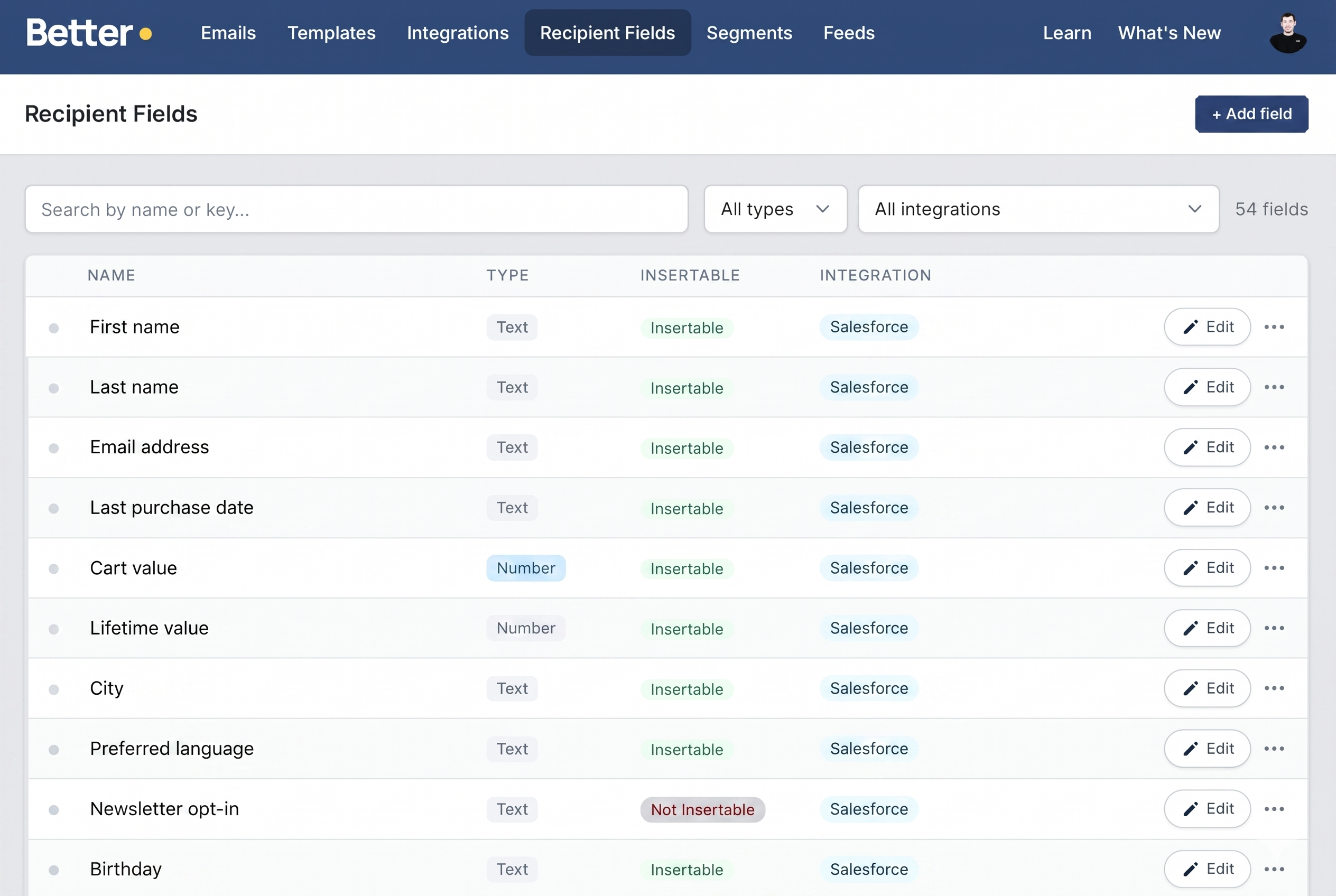
Before you can build segments, Better Email needs to know which fields are available in your subscriber data. You can add fields manually or sync them directly from your ESP — for example, pulling attribute sets from Salesforce Marketing Cloud.

Once synced, your recipient fields are available across the platform and ready to use as segment conditions.

Recipient fields overview showing synced fields from multiple integrations

Step 2: Create a segment​

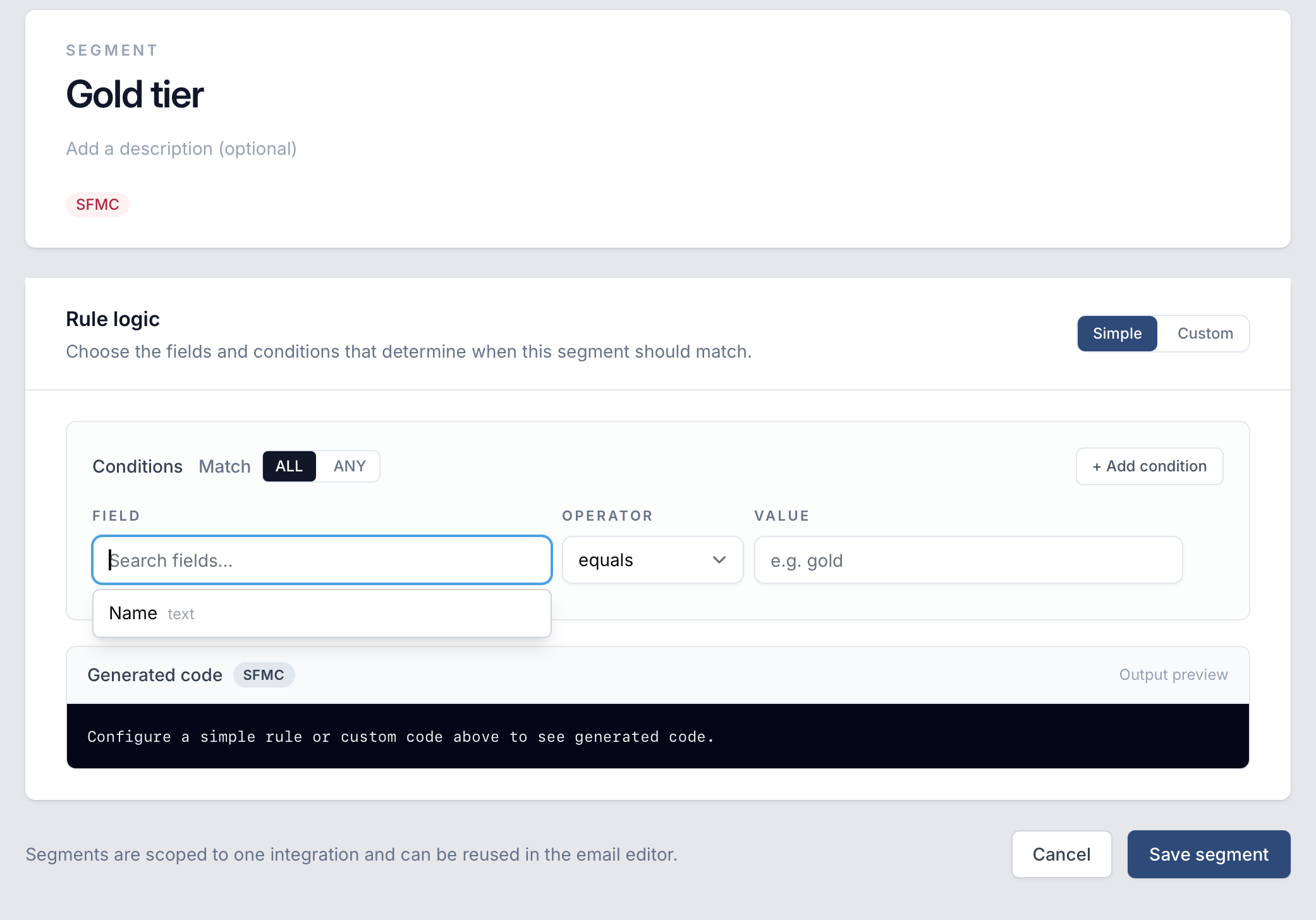
Head to Segments in the top navigation and create a new segment. Each segment is tied to a specific integration and can be reused across emails.

Simple mode lets you build conditions using a visual rule builder — pick a field, choose an operator, and set a value. Better Email automatically generates the correct ESP-specific code for you.

Segment editor using the simple rule builder with field, operator, and value conditions

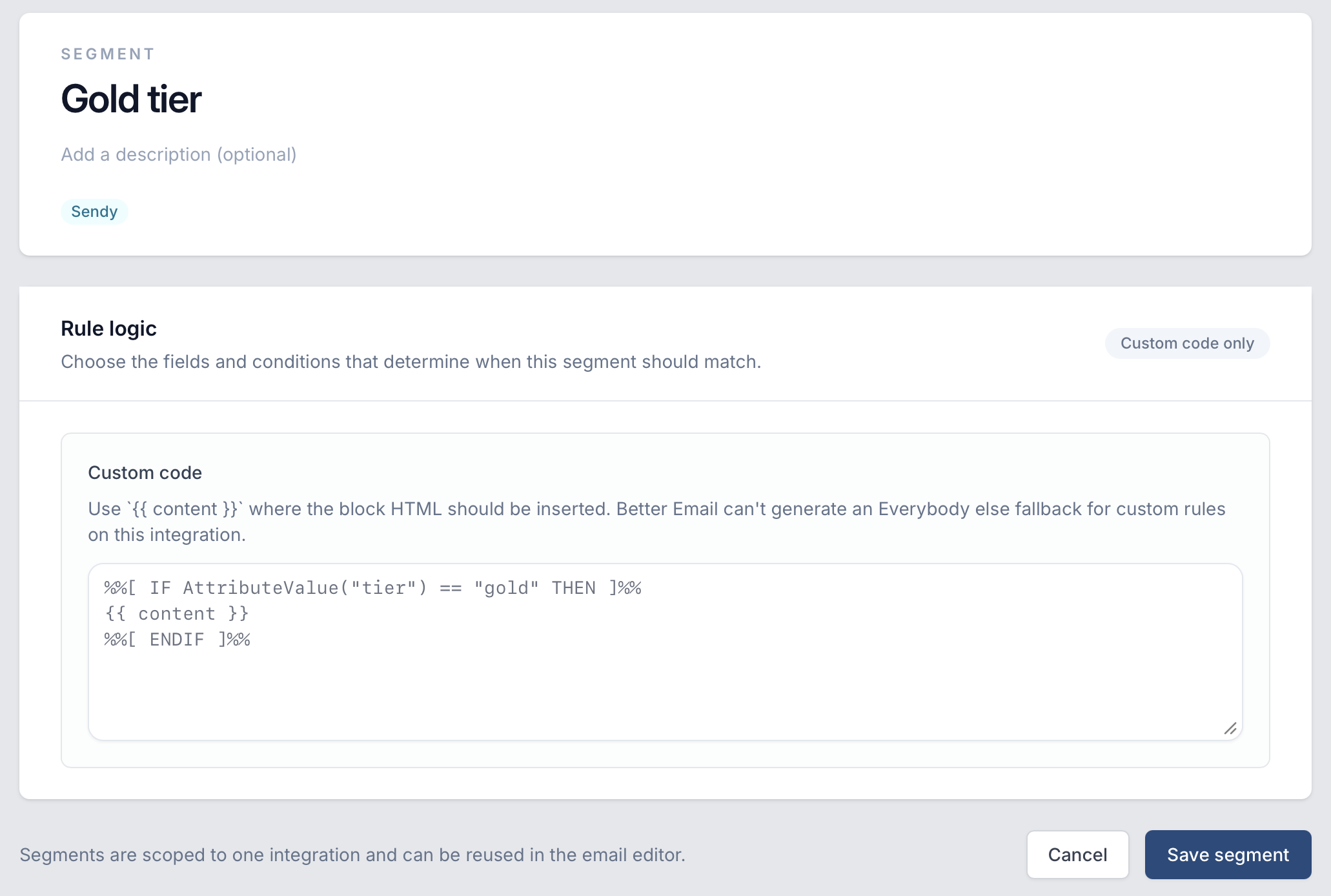
Custom code mode gives you full control. Write the conditional logic directly in your ESP's templating language and use {{ content }} as a placeholder for where the module HTML should be inserted.

Segment editor in custom code mode showing AMPscript conditional logic for Salesforce

Step 3: Apply segments in the editor​

With segments created, you can apply them to any module directly in the email editor. Select a module, open the Segmentation panel in the right sidebar, and assign one or more segments to it.

Each segmented module supports multiple variants — one per segment — and an automatic Everybody else fallback for recipients who don't match any of the conditions.

Segments are reusable — define them once and apply them to modules across any email in your account.

Betty Skills, Tone of Voice & Segmentation

Betty just got a lot smarter — and a lot more personal. New features give you fine-grained control over what Betty can do and how she sounds.

Betty AI Skills 🎯​

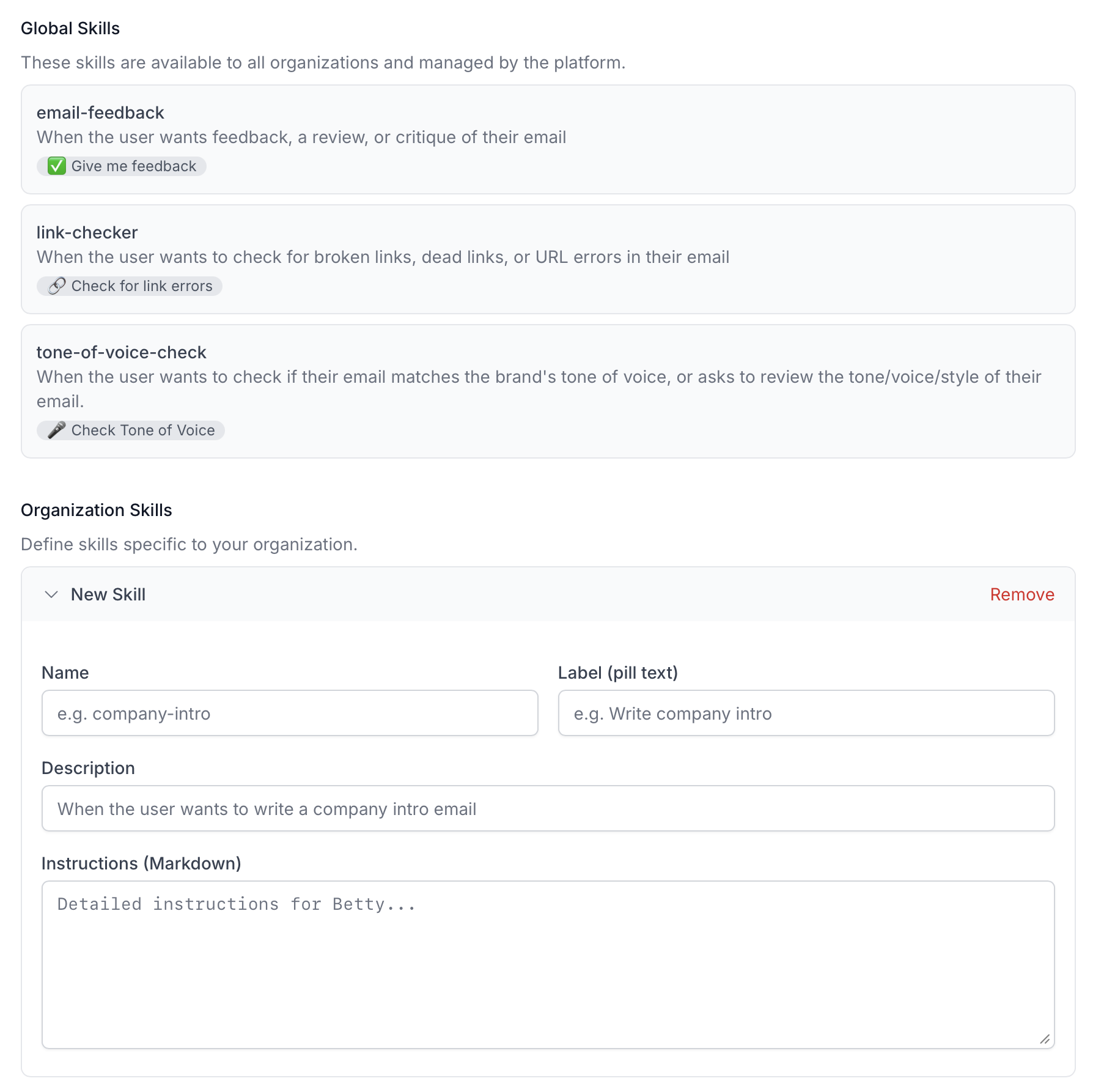
Betty now has a Skills system — a set of specialized capabilities that teach her how to perform specific tasks. Skills like "give feedback on this email", "check all links", or "review accessibility" give Betty deeper knowledge in focused areas.

When you open the chat, you'll see conversation starter pills suggesting common tasks Betty can help with. Behind the scenes, each skill contains detailed instructions that are loaded on demand, so Betty stays fast while still having access to deep expertise when you need it.

Betty skills overview

Organizations can also add their own custom skills to teach Betty workflows and conventions specific to their team — for example, how to create a specific type of campaign.

Tone of Voice ✍️​

Every brand communicates differently. With the new Tone of Voice setting, you tell Betty exactly how your emails should read — and she follows your lead. Whether your style is warm and conversational or sharp and professional, Betty adapts.

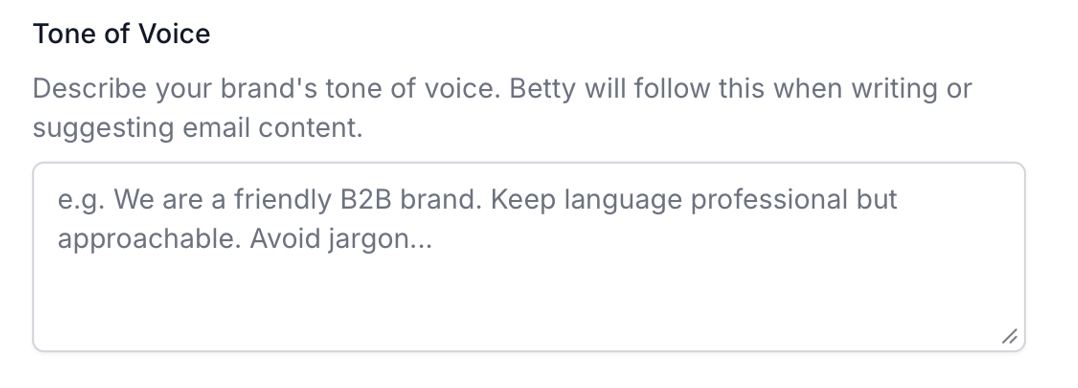
Head to Betty AI Settings and describe your brand's tone in your own words. Want short sentences at a grade 8 reading level? Prefer no emojis in transactional emails? Just say so.

Tone of Voice settings

From that point on, every piece of email copy Betty writes or suggests will match your guidelines — subject lines, body copy, CTAs, all of it.

Segmentation — Coming Soon 🎯​

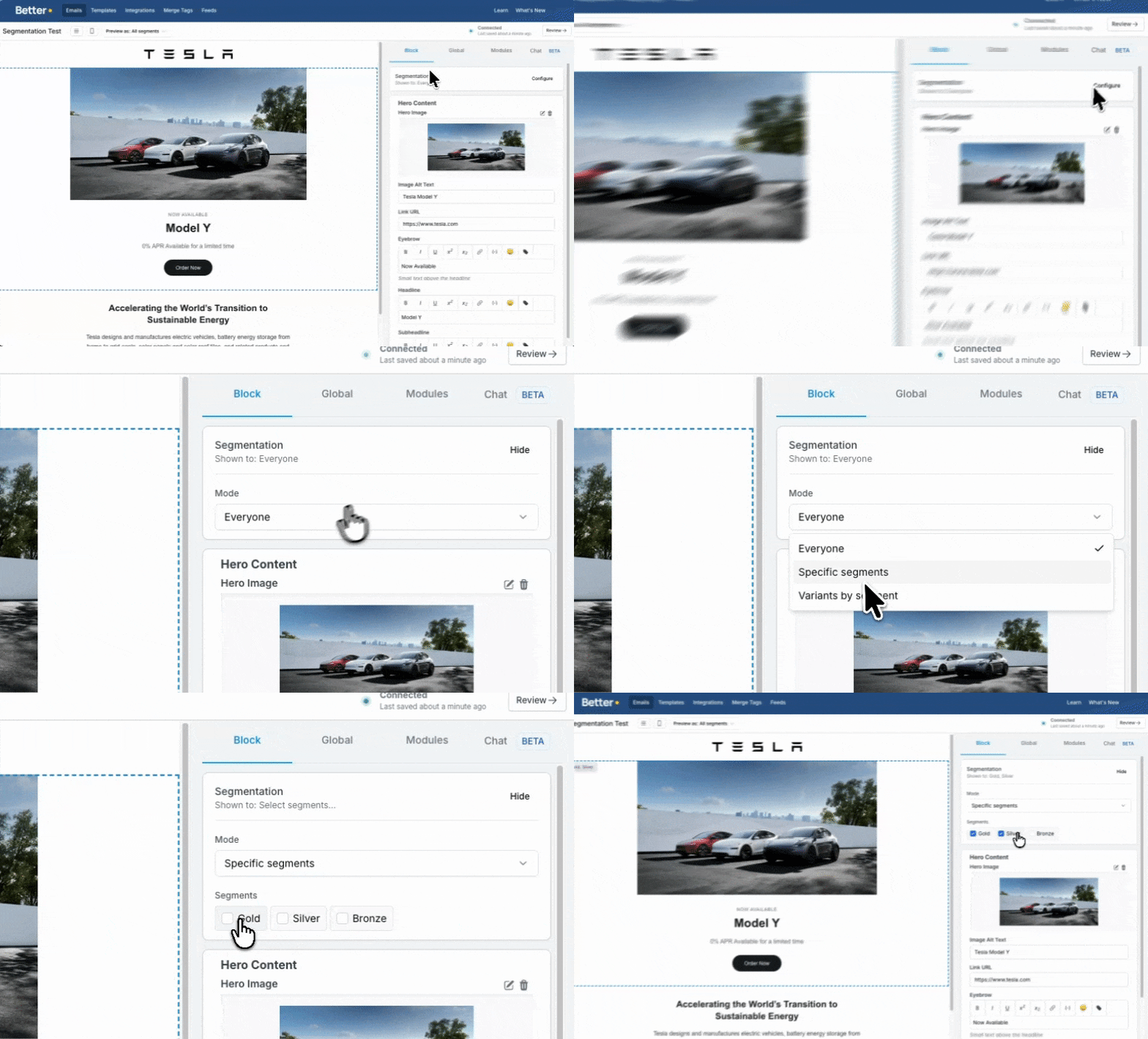
Full support for segmentation within the editor is on its way. Each block can be targeted to specific audiences, fully customizable to fit your needs.

This is module-based segmentation that natively works with any ESP — no custom integrations required. You have two powerful options: build your own segmentation setup and give your subscribers an easy way to segment themselves without any prior knowledge, or train Betty to help you set it up and manage it for you.

Segmentation preview

Introducing the Font Stack Builder for Email

We've just launched a new free tool that solves one of email development's most frustrating problems: font fallbacks.

The Problem​

You spend hours choosing the perfect font for your email campaign. You implement it carefully. And then half your subscribers see Arial anyway.

Why? Because email clients have wildly different font support, and most developers don't know which fonts actually work where.

The Solution​

Our new Font Stack Builder helps you create bulletproof font stacks that look great across all email clients.

Here's what makes it different:

  • 900+ Outlook fonts: Outlook supports way more fonts than most people realize. We've catalogued all of them.
  • Gmail's hidden fonts: Gmail has a list of supported fonts that almost nobody knows about. We've painfully tested every single one.
  • Visual comparison: See exactly how your font stack renders in Gmail, Outlook, Apple Mail, Yahoo, and Thunderbird.
  • Instant code: Copy the perfect font-family CSS with one click.

How It Works​

The tool guides you through a simple process:

  1. Choose whether your font is serif or sans-serif
  2. Select your custom font (or upload your own)
  3. Pick the closest Outlook fallback
  4. Choose your web-safe fallback
  5. See the results across all major email clients

No guesswork. No surprises. Just fonts that work.

Why We Built This​

After 8 years of email development, we got tired of explaining to clients why their beautiful custom fonts weren't showing up in Outlook or Gmail. We built this tool to make that conversation visual, educational, and actually useful.

Now you can show clients exactly what will happen, build a proper fallback stack together, and deliver emails that look great everywhere.

Try It Now​

The Font Stack Builder is completely free and requires no signup.

Launch the tool →

Questions or feedback? Let us know what you think.

Template Revisions

Templates now have full revision history, giving you version control for your email templates without leaving Better Email.

Named revisions​

You can create a named revision at any point to snapshot the current state of your template. Think of it as a save point — you can always look back and see exactly what the template looked like at that moment. This is especially useful before making large changes or when multiple people work on the same template.

Revision history​

Browse through all previous revisions of a template in the new revision history panel. Each entry shows when it was created and by whom, making it easy to track how a template has evolved over time.

AI-powered change summaries​

When you create a new revision, Betty can automatically describe what changed compared to the previous version. Instead of manually comparing code, you get a human-readable summary of the differences — which components were modified, what settings changed, and what content was updated.

Draft auto-save​

Your work-in-progress is continuously saved as a draft revision. If you navigate away or close the browser, your unsaved changes are preserved and waiting for you when you return.

Other fixes and improvements:

  • Fixed editor state when navigating between templates
  • Improved handling of multiple draft revisions
  • Templates now prompt to save before creating a named revision when there are unsaved changes

Platform Updates Q4 2025

A round of improvements and fixes from the last quarter of 2025.

Clone templates​

You can now clone an entire template with one click. This makes it easy to use an existing template as a starting point for a new one — keeping all components, settings, and logic intact while giving you a fresh copy to modify.

We've optimized the emails listing and search functionality for significantly faster load times. Whether you have dozens or hundreds of emails, browsing and searching your workspace now feels snappier.

Other fixes and improvements:

  • Fixed an issue where updating email settings could remove the email's assigned folder
  • Fixed sidebar navigation issues when switching between pages
  • Fixed Customer.io integration pagination when syncing large numbers of items
  • Fixed translation-related errors when the conditional controller was missing
  • Improved handling of select input default values

Betty AI Now Available in the Template Editor

Betty, our AI email assistant, is now available directly inside the template editor — bringing AI-assisted development to the people building and maintaining your email templates.

Betty understands your template​

Betty is aware of the template you're working on, including its components, settings, and structure. When you ask her to make a change, she knows exactly where to apply it. Ask her to "update the footer background color" or "add a new text block to the hero component" and she'll edit the right code in the right place.

Fetch content from the web​

Betty can visit any URL you give her and pull in relevant content. Working on a promotional email? Point Betty at your product page and she can extract copy, headlines, and other details to help you build the email faster.

Upload images while you chat​

You can upload images directly in the chat and Betty will incorporate them into the template. No need to switch between the asset manager and the editor — just drop an image into the conversation.

Component settings awareness​

Betty knows about each component's configurable settings — input types, default values, and available options. She can suggest changes that work within the constraints of your template rather than producing code that breaks the editor.

Other fixes and improvements:

  • Betty now fetches and uses your organization's brand colors and styling when available
  • Improved AI model for more accurate and reliable code edits
  • Fixed image upload handling in the new editor

New Template Editor

We've completely redesigned the template editor — the tool template developers use to build and maintain email templates in Better Email.

Modern code editor​

The code editing experience has been rebuilt with a professional-grade editor featuring a dark theme, syntax highlighting, and proper line wrapping. Writing HTML and Liquid code is now significantly more comfortable, especially for longer editing sessions.

Liquid tags highlighted in orange​

Liquid template tags now stand out visually in the editor with distinct orange highlighting. This makes it much easier to spot dynamic content, conditionals, and variables at a glance — especially in templates with a mix of HTML and Liquid logic.

Smarter component selection​

Components are now accessible through a streamlined dropdown instead of the previous panel layout. Switching between components is faster and leaves more screen real estate for the code editor itself.

Preview in a separate window​

You can now pop out the email preview into its own window. This is especially useful if you have multiple monitors — keep the code on one screen and the live preview on another.

Liquid key context​

The editor is now aware of the Liquid keys and variables available in your template. This helps reduce typos and makes it easier to work with complex templates that use many custom variables.

Other fixes and improvements:

  • Fixed save state persistence when switching between components
  • Improved modal behavior after creating new templates
  • Various styling and layout refinements

Agillic Integration

We're happy to announce our new integration with Agillic.

Export directly to Agillic​

You can now export your emails from Better Email straight into Agillic with a single click. Design your email in Better Email, connect your Agillic account, and push the finished result directly into the platform — ready to be used in your campaigns.

This joins our existing integrations with HubSpot, Salesforce Marketing Cloud, Klaviyo, Customer.io, and others.

Head to Integrations in your email settings to get started.

Introducing Betty — Your AI Email Assistant

We're excited to introduce Betty, an AI-powered assistant built right into the Better Email editor.

Chat with Betty while you build​

Betty lives in a new chat sidebar next to the email editor. You can ask her to write copy, rephrase a paragraph, adjust the tone of a headline, or brainstorm subject lines — all without leaving the editor. She works on the email you have open and understands which components and settings are available.

Edit components with natural language​

Instead of manually tweaking settings or writing content from scratch, you can tell Betty what you want and she'll make the changes for you. Ask her to "make the hero image darker" or "add a second product row" and she'll update the email directly.

Web search and brand import​

Betty can search the web for inspiration and reference material. She can also crawl a URL you provide — such as your company's website or a landing page — and pull in brand assets, colors, and content to use in your email.

Image upload​

You can upload images directly through the chat. Betty will place them in the right component and make sure they're properly sized for email.

Stop generation at any time​

If Betty starts heading in the wrong direction, you can stop her mid-response and redirect. No need to wait for a full answer before course-correcting.

Other fixes and improvements:

  • Chat messages are persisted as drafts, so you won't lose what you were typing if you navigate away
  • Image metadata is automatically attached for better context
  • Fixed various issues with tool call UI rendering